| Home Prev |  NetWall 200R Series Getting Started Guide NetWall 200R Series Getting Started Guide
|
Next |
|---|
This section is an overview of the NetWall 200R Series product's external connectivity options.
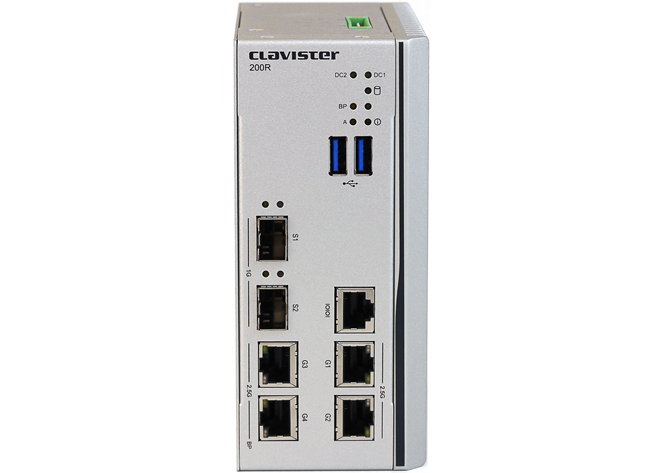
The NetWall 200R Series features the following connection ports:
2 x RJ45 2.5 Gigabit Ethernet interfaces
These have the logical cOS Core interface names G1 and G2. These names are written above each interface on the NetWall 200R Series casing.
The G1 interface is used for initial management connection over a network. The G2 interface can be used for the initial connection to e.g. the public Internet.
2 x RJ45 2.5 Gigabit Ethernet interfaces
These have the logical cOS Core interface names G3 and G4. These names are written above each interface on the NetWall 200R Series casing.
LAN Bypass
Interface G3 and G4 are configured as LAN bypass ports. For more information see Section 1.2.1, Bypass Functionality.
2 x Gigabit SFP 1 Gigabit Ethernet interfaces
These have the logical cOS Core interface names S1 and S2. These names are written above each interface on the NetWall 200R Series casing.
Note that only the SFP modules available from Clavister have been tested to function correctly with the 200R Series hardware. Clavister cannot guarantee that others will function correctly.
An RJ45 RS-232 console port
This port is used for direct access to the cOS Core Boot Menu and the cOS Core Command Line Interface (CLI). Connecting to this port is described in Section 3.5, Local Console Port Connection.
In the predefined default cOS Core configuration, the G2 interface of the NetWall 200R Series have an IPv4 DHCP client enabled so that the G2 interface can automatically be assigned an IP address if connected to an ISP
![[Note]](images/note.png) |
Note: The two USB Type A ports are not currently used |
|---|---|
|
The two USB Type A ports on the 200R Series front panel are for future functionality and are not currently used by cOS Core. |
All the Ethernet interface ports except G3 and G4 function independently of each other and are capable of link speed auto-negotiation. The interface names are written by each interface.
The full connection capabilities of all the NetWall 200R Series Ethernet interfaces are listed at the end of Appendix A, NetWall 200R Series Specifications.
RJ45 Ethernet Interface Status LEDs
The status lights on the NetWall 200R Series RJ45 Ethernet interface sockets indicate the following states for each interface:Left LED:
Right LED:
The Clavister 200R Series is a specialized Operational Technology (OT) firewall designed to meet the unique requirements of industrial and critical infrastructure environments. Its distinctive features set it apart from traditional firewalls, offering enhanced flexibility and fail-safe operations.
The bypass enabled ports are configured to behave like a two port switch. All ports are still fully configurable to use as regular routed ports with policies applied as needed, but at power loss the bypass enabled ports will forward all traffic without scrutiny as a layer-2 switch.
![[Warning]](images/warning.png) |
Warning: Bypass Functionality Behavior |
|---|---|
|
The Clavister 200R Series's behavior differs significantly from traditional firewalls, particularly in its bypass functionality. This feature ensures network continuity in critical OT environments but requires careful consideration when configuring the security policies in the 200R Series firewall. |
Bypass Ports And Default Configuration
The Bypass feature is active on ports G3 and G4 on the 200R Series. This means that during power loss, ports G3 and G4 would be cross-connected by physically connecting the two ports together. There exist no option to disable the Bypass feature.Default pre-configured security policies for G3 and G4 is is set to allow all communication between the G3 and G4 interfaces for all IP ports and protocols, it is configured to act as a layer-2 switch by default. The default policies can be edited by the administrator like any other IP policy if so desired.
|
Note: Custom Policies on Bypass Ports |
|---|---|
|
Please note that the default or custom policies are only active when the system is powered on and operational. |
Use Case Considerations
Ideal for environments requiring continuous network connectivity
Suitable for scenarios where network security is critical but cannot compromise operational continuity
Allows for custom tailored security policies during normal operation while providing a fail-safe during power loss