Clavister NetEye Cloud Getting Started Guide Clavister NetEye Cloud Getting Started Guide
|
Next |
|---|
| Clavister NetEye Cloud Getting Started Guide
|
Next |
|---|
![[Note]](images/note.png) |
Note: This document is also available in other formats |
|---|---|
|
A PDF version of this document along with all current and older documentation in PDF format can be found at https://my.clavister.com. It is also available as a single HTML page. |
Introduction
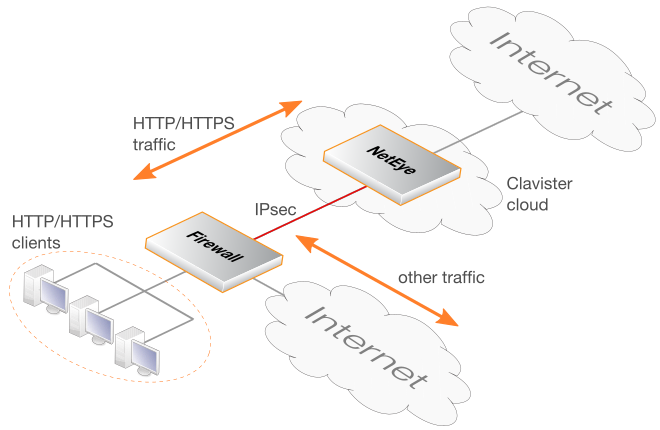
The NetEye Cloud service provides the ability for client HTTP and HTTPS Internet traffic to be scanned for viruses in the cloud. NetEye uses SSL inspection to perform this scanning on client HTTPS traffic. Should a virus be detected, the malicious file is dropped and a predefined HTML block page will be sent to the client.After the NetEye Cloud service is purchased, Clavister deploys a dedicated NetEye instance in the cloud. An IPsec tunnel then needs to be established between an on-premises network device and the NetEye cloud instance. This device could be a Clavister firewall, such as a NetWall appliance, or it could be some other non-Clavister device. Traffic can then flow through the tunnel between the customer's local networks and the public Internet via the NetEye cloud service, with NetEye applying anti-virus scanning.
NetEye is Transparent to Non-HTTP/HTTPS Traffic
The purpose of NetEye is to scan HTTP and HTTPS traffic. However, non-HTTP/HTTPS traffic can also be sent through the service. NetEye will be transparent to such traffic and it will pass to and from the Internet without any scanning being performed.NetEye Assumes Existing Internet Access
It is assumed that the device that sends traffic to NetEye will already have Internet access enabled. Public DNS lookup also is required to resolve the FQDN of the NetEye Cloud instance to an IPv4 address. Access may also be required to route HTTP/HTTPS traffic directly to the Internet which should not be subject to SSL inspection using whitelisting.The Solution for Unreachable Websites
Depending on the type of client being used (browser or mobile app), the SSL inspection used by NetEye may make some sites inaccessible. This may be because a site uses certificate pinning. The solution is not to send such traffic through NetEye and to route it straight to the Internet. This can usually be achieved by whitelisting FQDNs that are known to potentially be inaccessible when using SSL inspection. Setting up whitelisting is discussed in Chapter 5, Whitelisting.An Overview Diagram of the NetEye Cloud Service
The diagram below illustrates how traffic between protected clients and the Internet is processed by the NetEye Cloud service.