| Home Prev |  NetWall E80B Getting Started Guide NetWall E80B Getting Started Guide
|
Next |
|---|
This section is an overview of the NetWall E80B product's external connectivity options.
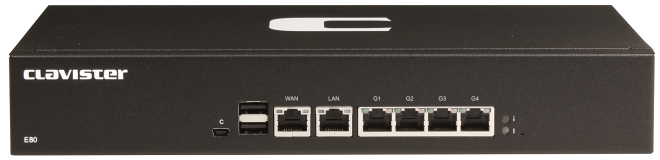
The NetWall E80B features the following connection ports on the front panel:
A mini-USB (type mini-B) port for console connection marked with the letter C. This port is used for direct access to the cOS Core Boot Menu and the cOS Core Command Line Interface (CLI). Connection to this port is discussed in Section 3.5, Mini-USB Console Port Connection.
6 x RJ45 Gigabit Ethernet interfaces with the logical cOS Core interface names WAN, LAN, G1, G2, G3, and G4.
By convention, WAN is usually used for connection to the Internet but any interface could be used for this purpose.
In default cOS Core configuration, the LAN interface has a DHCP server enabled on it and the WAN interface is enabled as a DHCP client. The default configuration also contains a basic rule set that allows web browsing by clients on LAN to the Internet on WAN.
![[Note]](images/note.png) |
Note: The two USB Type A ports are not currently used |
|---|---|
|
The two USB Type A ports on the E80B front panel are for future functionality and are not currently used by cOS Core. |
All the Ethernet interface ports function independently of each other and are not connected by a switch fabric. All are capable of link speed auto-negotiation and can operate using 10Base-T, 100Base-Tx, or 1000Base-T. The interface names are written by each interface.
The full connection capabilities of all the NetWall E80B Ethernet interfaces are listed at the end of Appendix A, NetWall E80B Specifications.
System Status Indicator LEDs
On the right hand side of the front of the E80B are two status LEDs. These indicate the following conditions:RJ45 Ethernet Interface Status LEDs
The status lights on the sides of the NetWall E80B RJ45 Ethernet interface sockets indicate the following states for each interface:Left LED:
Right LED: